

Published by

AI Agent Development at a Glance
across four complexity tiers
from discovery to production
document intelligence agents
customer service escalation
Artificial intelligence agents represent one of the most transformative opportunities for UK mid-market businesses. Unlike traditional software, autonomous agents can reason, plan, and execute multi-step workflows without human intervention. A procurement agent might negotiate supplier terms, raise purchase orders, and monitor delivery timelines—all without a manager pressing "approve." A legal agent could review contracts, flag risks, and extract key commercial terms at enterprise speed.
For businesses struggling with manual workflows, this is the difference between hiring five new staff and deploying a single integrated system. Yet building AI agents is not trivial. Costs range from £50k for simple automation to £1.2M+ for enterprise systems. Development timelines stretch from 6 weeks to 12 months. And governance—ensuring agents remain explainable and compliant—demands new organisational disciplines.
This guide covers everything your leadership team needs to know: how agents work, realistic cost expectations, vendor evaluation frameworks, and governance requirements under UK law.
What is an AI Agent?
An AI agent is an autonomous system that perceives its environment, reasons about goals, and takes action to achieve them. Unlike traditional software, agents can:
- Perceive — integrate data from multiple business systems (ERP, CRM, email, documents)
- Reason — use language models to interpret context, make trade-off decisions, and plan workflows
- Act — execute changes across systems using APIs, databases, and integrations
- Learn — improve actions over time based on feedback and outcomes (in mature implementations)

The diagram illustrates a typical agent loop: an event triggers the agent (e.g., a new service ticket arrives), the agent perceives the environment (reads the ticket, pulls customer history, checks inventory), reasons about the best response (classify the issue, predict resolution time), and then acts (updates the ticket, notifies the customer, logs the resolution).
Chatbots and traditional automation are fundamentally different. A chatbot is a conversational interface—it responds to user input following predefined conversation flows. An agent is an autonomous worker—it initiates actions, adapts to unexpected situations, and operates continuously without human prompting.
The Four Tiers of AI Agent Complexity
Agent implementations vary dramatically in sophistication and cost. We classify them into four tiers based on architecture, integration depth, and autonomous decision-making:
Tier 1: Simple Tool-Calling Agents
Use case: Automating single-step workflows with a small tool set (typically 3–5 integrations)
Example: A recruitment agent that searches job boards, screens CVs against job descriptions, and creates candidate records in your HRIS.
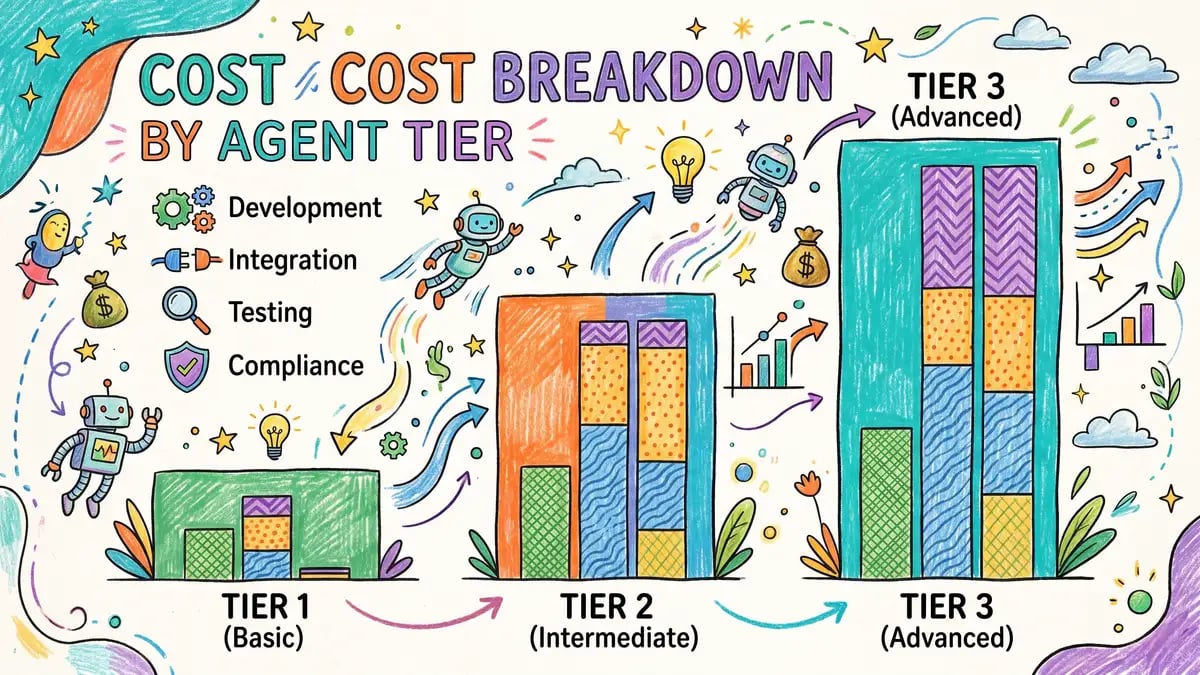
Development cost: £50k–£100k
Timeline: 6–10 weeks
Architecture: Language model + function calling interface + light orchestration
Governance burden: Low—typically no high-risk decisions, audit trail minimal
Tier 2: Multi-Step Workflow Agents
Use case: Orchestrating workflows with 5–15 sequential or conditional steps, light decision-making
Example: An expense agent that receives a scanned receipt, extracts line items via OCR, matches costs to cost codes, applies approval rules (CEO approval if >£10k), and posts to the general ledger—all automatically.
Development cost: £150k–£300k
Timeline: 16–20 weeks
Architecture: Language model + workflow engine (e.g., LangGraph, CrewAI) + 8–15 API integrations
Governance burden: Medium—must log decisions, maintain audit trail, support override capability
Tier 3: Enterprise Autonomous Agents
Use case: High-autonomy systems making significant business decisions with minimal human oversight
Example: A procurement agent that negotiates supplier discounts, raises POs, monitors supply chains, and dynamically switches suppliers based on cost, quality, and lead time. Decisions impact 7-figure annual spends.
Development cost: £300k–£500k
Timeline: 30–40 weeks
Architecture: Multi-model reasoning, advanced RAG, 20–30 tool integrations, reinforcement learning feedback loops
Governance burden: High—requires explainability frameworks, continuous monitoring, human-in-the-loop validation for edge cases
Tier 4: Multi-Agent Systems
Use case: Multiple autonomous agents working in concert, handling cross-functional workflows
Example: A sales team of agents where one agent manages lead qualification, another handles negotiation, a third manages post-sale onboarding, and a fourth monitors customer health. Agents hand off work, share context, and coordinate decisions.
Development cost: £500k–£1.2M+
Timeline: 48–60 weeks
Architecture: Multiple language models, shared memory/context management, consensus protocols, inter-agent communication protocols
Governance burden: Very high—complex audit trails, cross-agent accountability, regulatory reporting
Development Costs: What You Actually Pay
Agent development is bespoke. Cost drivers include:
- Number of integrations — Each API connection requires discovery, authentication, error handling, and testing. A single integration costs £2k–£5k in development.
- Decision complexity — Simple rule-based decisions (if X then Y) are cheap. Multi-factor trade-off decisions (optimize for cost AND quality AND delivery time) cost more and require validation.
- Data quality preparation — Agents are only as good as their data. Cleaning, normalising, and enriching datasets can consume 20–40% of project time.
- Testing and validation — Autonomous systems must be extensively tested. Expected vs. actual outcomes must be compared, edge cases identified, and failure modes documented.
- Compliance and audit — If your agent makes decisions affecting individuals (hiring, credit, performance), GDPR Article 22 and the UK AI Act impose explainability and auditability requirements that add 15–25% to cost.
How to Choose Your Agent Architecture
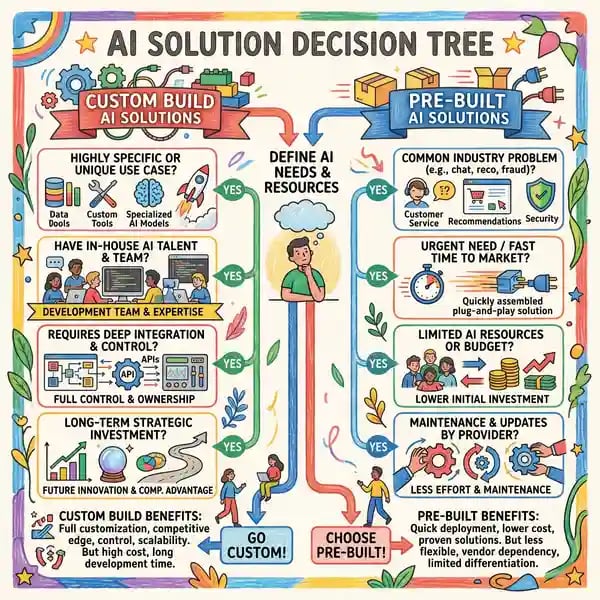
Custom Build vs. Pre-Built Platforms
Build a custom agent if:
- Your workflows are unique to your business
- You need tight integration with proprietary systems
- You require significant competitive advantage or differentiation
- You have the development capacity (in-house or vendor) to sustain it
Buy a pre-built solution or low-code platform if:
- You need speed to market and the standard use case matches your workflow
- You have limited development resources
- You prefer lower upfront cost and faster ROI
- Your workflow is similar to hundreds of other companies (e.g., expense processing)
Hybrid approach (recommended for many): Customise an existing platform rather than build from scratch. You get a proven foundation and faster time to value, but customise the decision logic and integrations to your business.
Key Vendor Evaluation Criteria
If you are evaluating vendors or evaluating in-house build vs. outsource, assess them on these dimensions:
- Integration breadth — Can they connect to your core systems (ERP, CRM, accounting, HRIS)? Out-of-the-box vs. custom development?
- Model choice — Do they lock you into a single model (OpenAI, Anthropic, Google) or can you mix and match? Can you run models on-premises for sensitive data?
- Governance and auditability — Can they log every decision, capture reasoning, and support human override? Critical for regulated decisions.
- Explainability — Can you show a regulator or audit team why the agent did what it did?
- Security and data residency — Where is your data stored? Can you ensure it stays within UK/EU boundaries?
- Cost model — Fixed cost per agent, per decision, per token, or something else? What happens as you scale?
- Support and handoff — If you build with a vendor, can you run it independently later? Or are you locked in?
Real-World ROI: Case Studies
Agent ROI varies dramatically by use case. Here are realistic benchmarks from UK mid-market implementations:
Document Intelligence Agents (e.g., Invoice, Contract, Claim Processing)
Typical Year 1 ROI: 185%
Payback period: 4–6 months
Cost savings: £120k–£300k annually (depending on document volume)
Why high ROI: Agents replace highly repetitive manual work (data entry, classification, exception flagging). Each document typically takes 10–20 minutes to process manually; agents do it in seconds. With 50–100 documents per day, ROI is immediate.
Risk: Accuracy threshold must be set correctly. Over-automating complex edge cases can lead to errors. Most implementations run at 85–95% accuracy and escalate exceptions to humans.
Customer Service Escalation Agents
Typical payback period: 5 months
Cost savings: £80k–£200k annually
How it works: Agent reads incoming support tickets, assesses urgency and complexity, auto-resolves simple issues (password resets, FAQs, status checks), and escalates complex ones to human agents with full context.
Why lower ROI than document processing: Customer service agents must maintain brand voice, handle exceptions gracefully, and preserve customer relationships. This requires more oversight and fine-tuning. Fewer decisions are purely mechanical.
Benefit beyond cost: First response time drops significantly, and customer satisfaction often improves because agents never miss a ticket or forget context.
Procurement Automation
Cost savings: £200k–£585k annually
How it works: Agent receives purchase requests, searches supplier catalogs, negotiates volume discounts, validates budget codes, and raises POs automatically. Humans review significant deviations or new suppliers.
Why variable ROI: ROI depends on your procurement volume and the degree of human oversight. A large manufacturing company with 2,000 POs per month will see £585k+ savings. A small firm with 100 POs per month will see £50k–£100k.
Hidden benefit: Procurement cycle time drops from days to hours, improving cash flow and enabling better supplier relationships.
Sales Pipeline Management
Cost savings: £50k–£150k annually (in sales team time)
Payback period: 6–12 months
How it works: Agent monitors incoming leads, enriches them with company data, identifies warmth signals (webinar attendance, email engagement), and recommends next actions (call, email, proposal). Sales reps focus on closing rather than admin.
Why slower payback: Sales is qualitative. Agents assist but don't replace judgment. Benefits are gradual and tied to sales cycle length. A 90-day sales cycle will take 6+ months to see full ROI.
UK Governance and Compliance Requirements
AI agents are increasingly regulated in the UK. Your implementation must address:
GDPR Article 22: Automated Decision-Making
If your agent makes decisions that have a legal or similarly significant effect on an individual (e.g., hiring, credit, employment termination), GDPR Article 22 requires human intervention. You cannot operate a recruitment agent that rejects candidates without human review, nor a credit agent that auto-declines loan applications.
Your obligations:
- Provide transparent information about the logic, significance, and consequences of automated decision-making
- Allow individuals the right to request human review and explain your decision
- Maintain records showing the agent's reasoning
UK AI Act (Post-2024)
The UK AI Act classifies AI systems into risk categories. Agents used in high-risk scenarios (hiring, credit decisions, procurement for public funds, law enforcement) must:
- Undergo impact assessments documenting potential harms
- Maintain detailed documentation of training data, testing, and performance metrics
- Be regularly monitored for bias and performance drift
- Be explainable: you must be able to show why the agent did what it did
Practical Governance Checklist
Regardless of regulation, implement these practices:
- Decision logging — Every decision the agent makes must be logged with timestamp, input data, reasoning, and outcome. Required for audit and improvement.
- Human-in-the-loop for high-stakes decisions — If the agent's decision impacts revenue or reputation (e.g., customer termination, large PO), require human sign-off.
- Continuous monitoring — Track agent performance over time. Is accuracy degrading? Are certain segments underserved? Set up automated alerts.
- Explainability — Document the decision logic in plain English. If you can't explain it to your finance director or regulator, fix it.
- Bias testing — Systematically test the agent's decisions for unintended bias (e.g., does it treat candidates differently based on gender or ethnicity?)
- Override capability — Humans must always be able to override or reverse an agent decision. This is both good governance and legally safer.
Implementing Your First Agent: A Roadmap
Phase 1: Identify High-ROI Use Cases (Weeks 1–4)
Not all workflows benefit equally from agents. Focus on workflows that are:
- High-volume — Handled frequently (daily or more)
- Repetitive — Follow consistent patterns with few exceptions
- Rule-based — Rely on logic rather than judgment (at least initially)
- Costly to handle manually — Involve expensive staff time or external services
- Low-risk — Errors have limited downside (at least for your first implementation)
Ideal candidates: expense processing, invoice approval, lead enrichment, document classification, customer support triage. Avoid: strategic hiring decisions, major customer negotiations, product roadmap planning.
Phase 2: Proof of Concept (Weeks 5–12)
Build a small pilot with real data from your chosen workflow:
- Define success metrics (cost savings, cycle time, accuracy target)
- Collect 100–500 historical examples to test the agent against
- Build the simplest agent that solves the problem (avoid over-engineering)
- Run silent mode: agent recommends actions but humans execute them, allowing you to validate accuracy without risk
- Measure actual vs. target performance before go-live
Phase 3: Go-Live and Iterate (Weeks 13+)
Deploy the agent and monitor closely:
- Start with a subset of transactions or a pilot user group
- Monitor decision quality and override rate in real time
- Weekly reviews: identify systematic failures, retrain if needed
- Gradually increase automation as confidence grows
- After 4–8 weeks, assess whether to expand to additional workflows or scale to full volume
Frequently Asked Questions
Will AI agents replace my staff?
Short answer: they will shift roles, not eliminate them. Agents excel at high-volume mechanical work. Staff are redeployed to judgment calls, customer relationships, and strategic work. A recruitment team operating an agent no longer spends 40% of time screening CVs; instead, they spend time building recruiting strategy and nurturing candidate relationships. Cost savings come from reduced headcount, not layoffs—most companies use agents to handle growth without hiring.
What if my data quality is poor?
Agents amplify data quality issues. Garbage in, garbage out. Before building an agent, invest in data cleaning and normalisation. This typically consumes 20–40% of a project budget but is non-negotiable. If your supplier master data is inconsistent, your procurement agent will make bad choices.
How much customisation will I need?
Almost all agent projects require 30–60% of effort dedicated to customisation and integration. Off-the-shelf solutions are rare. Your workflows are probably unique in some way (different approval hierarchies, custom fields, legacy system dependencies). Budget accordingly and choose vendors or partners experienced in your industry.
How do I measure agent performance?
Define metrics upfront: accuracy (% of correct decisions), precision (% of confident decisions that are correct), recall (% of edge cases identified and escalated), cycle time reduction, and cost savings. Compare the agent's decisions to human decisions on the same data. Track these weekly; be prepared to retrain or adjust the agent if performance drifts.
Conclusion: Is It Time for Your Business?
AI agents are no longer experimental. Dozens of UK mid-market businesses are operating agents in production—processing invoices, managing procurement, triaging support tickets, qualifying leads. ROI is proven for the right use cases.
The question is not whether to build agents, but which workflows to prioritize and how to govern them safely. Start with a low-risk, high-volume workflow. Measure outcomes rigorously. Invest in data quality and governance before scaling. And remember: agents amplify both good decisions and bad ones, so get the fundamentals right first.
If your team is spending more than 10% of time on mechanical, rule-based work, you have a candidate workflow for an agent. The cost of building that agent typically pays for itself within 6–12 months.
Ready to Evaluate AI Agents for Your Business?
Our AI consultancy team helps mid-market businesses identify high-ROI agent opportunities, evaluate vendors, and implement governance frameworks. Let us help you avoid costly mistakes and accelerate time to value.
Discuss Your AI Agent Project →structured AI proof of concept